

Watch Vimeo together online
Open a creator film, portfolio, course or unlisted review link in a private room built for watching and discussing the same cut.
Open a Vimeo video
Vimeo onlyPaste the full link. Keep the unlisted hash and any access details supplied by the owner.
- No browser extension
- Private room for review
- Chat and video call
How to watch Vimeo together
- 1Paste the complete Vimeo video URL, including an unlisted hash when the owner uses one.
- 2Choose the recognised video — BlaTube creates a private room for the review or screening.
- 3Invite collaborators or friends who already have permission to view the Vimeo source.
- 4Review in sync while chat, reactions and video call stay beside the film.
Try a Vimeo Staff Pick or creator film
Choose a public creator video — BlaTube will open it in a new private review room.
Vimeo links and access rules
- Creator films, portfolios, courses and review cuts work when Vimeo allows the source to be embedded.
- Unlisted Vimeo links must include the complete hash; passwords and project access remain controlled by the owner.
- Private, disabled or allowed-domain-only embeds will not play unless every participant has the required access.
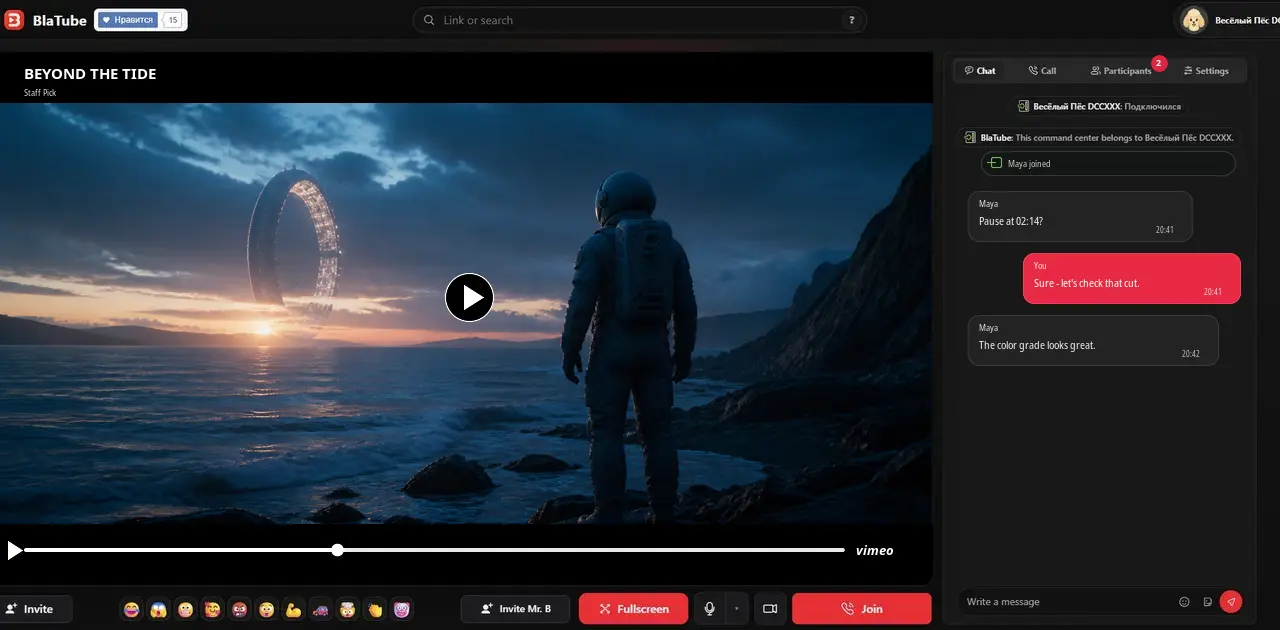
What a Vimeo review room looks like
The Vimeo film fills the media column while collaborators, playback state, chat and video call remain visible beside it.
Vimeo links for screenings and review
Paste the full URL for one creator film, portfolio piece, course, presentation or work in progress. Standard vimeo.com/… and player links work when Vimeo permits playback; an unlisted Vimeo video must keep its private hash in the link.
Passwords, privacy and domain restrictions
A Vimeo owner can require a password, restrict viewers, disable embedding or allow playback only through an allowed-domain list. BlaTube cannot remove those controls. Before a screening or client review, confirm that every participant has permission and that the source can be embedded outside Vimeo.
Other watch-together options
Use BlaTube for a mixed-source room, YouTube together for YouTube search, Twitch together for live channels and VODs, or Dailymotion together for public media clips.
Questions about watching Vimeo together
Can BlaTube open an unlisted Vimeo video?
Yes, when the complete unlisted URL includes its hash and Vimeo permits embedding. Everyone still needs the owner’s permission.
Will a password-protected Vimeo video work?
The password and access flow remain controlled by Vimeo. Each participant must satisfy the source requirements; BlaTube does not bypass them.
Why does a Vimeo video play on Vimeo but not in the room?
The owner may have disabled embedding or limited it to approved domains. Ask the owner to allow the intended playback context.
Do collaborators need the browser extension?
No. A supported Vimeo link works in the browser when the source allows embedding and every viewer has access.
Can I review a work in progress with a client?
Yes. Use a private BlaTube room and share the Vimeo access information only with people authorised by the owner.
Can we discuss the film during playback?
Yes. BlaTube keeps text chat, reactions, participant status and video call next to the shared Vimeo player.