
Watch streams together online
Search for a live stream, premiere, or VOD across supported video platforms, or paste its direct link. Create a room and keep the player, participants, chat, and call together.
Find a stream or paste its link
Enter a title to search supported video platforms, or paste a direct link right away.
- Live stream or recording
- Private room
- Chat and call
How to watch a stream together with friends
- 1Enter a stream title or paste a direct live, premiere, or VOD link.
- 2Choose a search result — BlaTube will create a room with that source.
- 3Send the BlaTube invitation link to your friends.
- 4Wait for everyone, then watch and talk without leaving the room.
What a stream is and what you can watch together
A live stream is video sent to viewers in real time. A premiere starts on schedule, while a VOD is a saved broadcast.
Live stream
The broadcast is happening now. You can react together, but ads and latency depend on the source platform.
Premiere
The video starts at a scheduled time. The room helps everyone gather before it begins.
Stream recording
A saved broadcast can be paused, rewound, and returned to the same moment.
Viewer room
BlaTube does not broadcast your screen. It gathers viewers around an external player and adds chat and a call.
What to check before inviting friends
- Use a specific live stream, premiere, or recording instead of a search page or general catalogue.
- Check that every participant can open the source without an unavailable subscription or regional restriction.
- For live video, allow for individual ads, connection quality, and latency from the source platform.
What a shared stream room looks like
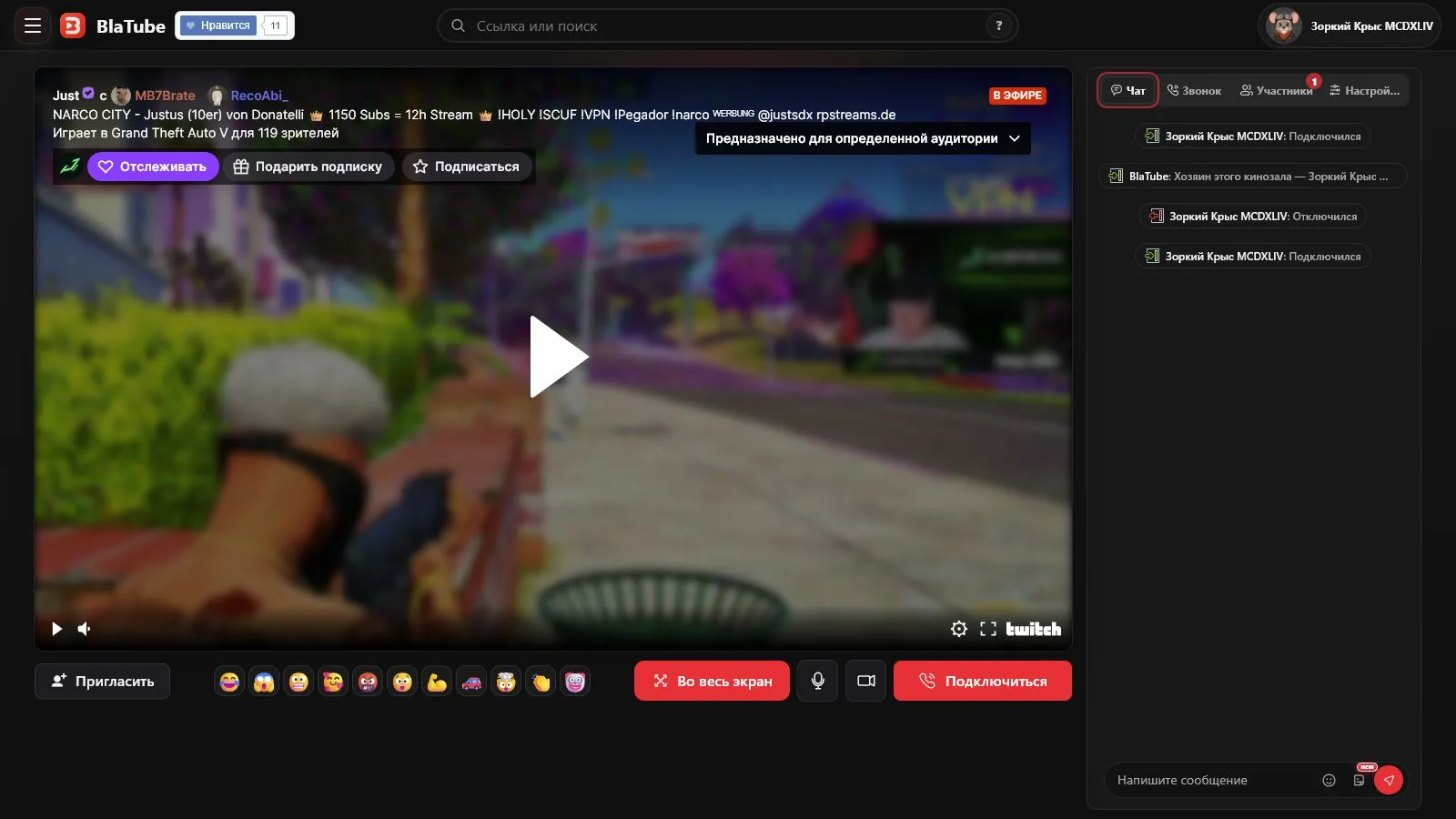
The stream occupies the main area of a BlaTube room. Participants, playback states, chat, stickers, and the call stay next to it.
What makes a stream different from a regular video
A live stream is sent to viewers in real time. A premiere starts at a scheduled time, while a VOD is a saved broadcast with a normal timeline.
Ads, buffering, quality, and low-latency settings can put viewers at slightly different points in a live broadcast. BlaTube keeps the room and conversation together, but the external platform still delivers the stream.
A viewer room, not a new broadcast
BlaTube does not create a co-stream or rebroadcast the source. It creates a room around an external player and adds an invitation, participants, chat, stickers, and a call.
Accounts, subscriptions, age rules, and regional restrictions remain with the source. For Twitch-specific channel search, live behavior, and VODs, use Watch Twitch together.
Questions about watching streams together
Can two people watch a stream together remotely?
Yes. Search for an available stream or paste its direct link, create a BlaTube room, and send the invitation to the other viewer.
Which platforms can I search?
The page searches supported results from YouTube, Rutube, VK Video, and Twitch. A direct supported link can also be pasted into the same field.
Why can live video be delayed differently for each viewer?
The source platform, quality setting, buffering, ads, and low-latency mode can shift viewers relative to the broadcast.
Can we pause and rewind a stream?
A VOD usually supports pausing and seeking. Live controls depend on the source platform and its player.
Does BlaTube start my own co-stream?
No. BlaTube is for watching an existing external stream or recording together; it does not broadcast your screen.
Do I need to install an app?
No. A supported source opens in the browser, although the source may still require its own account or subscription.